Showing posts with label Tutorials. Show all posts

Monday, November 1, 2021

Inside Pop-up Fold Card Directions

Happy Monday, peeps!  Fall has certainly fallen here in SE PA!  Brrr!  Mother Nature can't make up her mind as to whether she wants rain or sun!  I had a request from a reader for directions to make this card, but she didn't leave me her email, so I'll do a quick tutorial.  (If you need more detailed instructions, just email me, don't leave it in the comments.)  I needed a 60th anniversary card for a couple at church and decided to use that as my sample; it's pretty basic, no extra stamping, but you should get the idea!  Here's the card to get us started:


And the inside:


So to start, you'll need an 8 1/2" x 5 1/2" piece of cardstock, scored on the 8 1/2" side at 2 1/8" from each end to create a gate-fold card.  You can decorate the front however you desire.  Take a piece of designer paper that is 4" x 8" and score on the 8" side at 2" and 6".  Make a little pencil mark at the top and bottom of the paper at the 4" mark, which will be at the halfway point.  Score diagonals like this:


You'll be scoring from each outside corner to the opposite halfway pencil mark.  (You'll be making four diagonal scores.) Fold and burnish on all the fold lines.  Pinch the folds at the 2" and 6" mark so they fold towards you, and the center diamond stays to the back:


Now is the time to decorate the diamond panel, BEFORE it's glued down, as well as doing any stamping on the inside top and bottom of your card, if you desire.  I chose not to do any on this card.  For my diamond panel, I stamped some images from Number of Years (ret):


To adhere it to the center of the card, I found it was easier to fold it all together and use liquid glue to adhere JUST the bottom diamond portion to the inside of the card, centering it.  Using the liquid glue allows you to wiggle it around a bit if it's not positioned quite right.


Once that portion is secure, you can adhere the outer triangular shaped panels to the inside of the card sides.  Just make sure, again, that everything is even and nothing is sticking out over the edge of the card.


You can add a decorative panel to the front, just make sure that you only adhere it to one side so that the card can still be opened.  I diecut my numbers from the retired Large Numbers die, and used the Stitched Shapes and Pierced Blooms for my panels.  To hold it shut, I used a ribbon under dimensionals for this card, but my friend Karen used small velcro dots and on my Halloween card, I used small magnets.  Use your imagination!  Hope this was helpful so that you can make your own pop-up card! Thanks for popping by today!  

As a child, I was never into spooky, scary Halloween costumes, but my granddaughter apparently is!  She made her own "zombie soccer player" costume....whatever!  They bought all the pieces at the local Goodwill and she did her own zombie-ing to it!!!


Enjoy your day and be blessed!

Project Details—All Products SU! Unless Otherwise Specified
Stamps Number of Years (ret)
Card stock & Papers     Basic White, Misty Moonlight, Harvest Meadow DSP
 Ink Misty Moonlight
Accessories Dimensionals, White Twill Ribbon (ret)
Tools     Big Shot, Stitched Shapes Dies (ret), Pierced Blooms Dies, Large Numbers Dies (ret), Ornate Flowers Embossing Folder, Scoring Tool

Monday, June 21, 2021

Tower Father's Day Card

Happy Monday, everyone! Hope you had a good weekend!  I promised I would try to share some directions for this card, and while the photos aren't very good, I do have a bit of a tutorial for you!  Since I already had the cardstock cut, scored and assembled to make the sample, I went ahead and decorated it for Wayne's Father's Day card:


I used lots of retired SU products, did some embossing and fussy-cutting:


Some stamping and diecutting (even though he's technically not my son, he IS my #1 son-in-law!):


And had a fun time doing it!  He loves football (Eagles) and baseball (Phillies) and he is the manager of our church softball team (we are currently in first place!) so I made sure I got some of those elements in there as well!


Now for the tutorial; as I said, the photos are not very good, but hopefully you'll be able to still get the gist of it!  This creates a standard sized card, so the panels to be decorated are not real big, but I think it still makes for an impressive card!  So here we go:

1.  Cut 4 pieces of cardstock 2 5/8" x 5 1/2".  Score each one at 1/2" on the short side and fold and burnish.  You should have a 1/2" "tab" along each left side:


2.  Lay one piece on your work surface with the left tab facing up.  Apply strong adhesive or tape to the back of the tab on the second piece of cardstock.  Adhere the edge of that tab right next to the fold of the piece that is on your work surface:


3.  Do the same thing for the third piece:  apply strong adhesive to the back of the tab and adhere that right along the fold on the second piece of cardstock.  


4.  If you stand it up, it should look like this:


5.  Do the same thing with the last piece of cardstock. 


 6.  It should look like this:


7.  Flip over the entire piece and apply strong adhesive to the remaining tab, which is the tab on the very first piece you laid on your work surface.  Carefully adhere that to the remaining piece of cardstock, again, right next to the fold.  This is where it will turn into a 3D card.  It is helpful to pick it up to maneuver that last tab into place.


8.  Your final piece should look this this:


Be sure to burnish your tabs to make sure your adhesive stays tight....Tear N Tape or Sticky Strip works great!  When you flatten your card, it should measure 4 1/4" x 5 1/2".  At this point, you can pop it back out and decorate in whatever way you wish.  It is helpful to create a test one first using some scrap cardstock or paper.  Once you get the basic idea down, they come together quickly!  Have fun, hope it was helpful!  And enjoy your day and be blessed!

After a long day:


Project Details—All Products SU! Unless Otherwise Specified
Stamps Camouflage, Epic Alphabet, Have a Ball, Misc Paper Pumpkin (all ret)
Card stock & Papers     Basic White, Basic Gray, Basic Black, Smoky Slate, Call me Clover (ret)
 Ink Cajun Craze, Garden Green, Smoky Slate, Real Red, Cinnamon Cider, Crumb Cake
Accessories Dimensionals
Tools     Big Shot, Stars EF, Decorative Dots EF (all ret), Diamond Plate EF (Cuttlebug), Typewriter EF (Tim Holtz), Timeless Type Alphabet Jr Sizzlits Dies (ret)

Tuesday, October 20, 2020

RRCB146 Boo! and a DiecutTutorial

 Happy Tuesday, peeps!  It's time for a new Retro Rubber challenge, where we use stamps that are least a year old!  Here's our prompt for this challenge:


What a cute prompt....and here's my take on it:


I diecut three pumpkins from Pumpkin Pie cardstock; the only stamping is the alphabet, which I won several years ago; it's from Concord & 9th, and I don't usually use alphabets, but I hung on to this one and I am glad I did!  Here's a close-up:


My background paper is from SU, from a few years back, and I added some black, orange and white glimmer stars for fun!  And here's the inside, using a CTMH set from 2018:


Now, I want to show you a little trick I came up to make using dies a little easier. I am sure someone may have come up with this before, but it's always good to see it again! These Impression Obsession dies are not open; they are solid, and if you look closely, you can see the ridges on the pumpkins:


Now, if you are just cutting out a plain pumpkin, that would be easy.  But I wanted to stamp a letter on the pumpkin before I diecut it because I knew I would not get a good image stamping over top of those ridges once I diecut it.  But I can't see the letter stamped on the cardstock to center it, because the die is closed.  So, I cut a template from a piece of cardboard (the white piece here) first:


I then stamped my letter on the cardstock, laid it on my Big Shot platform, and laid the template over it, centering it where I wanted it:


I placed the die over top of the template, seating it in the opening; it just sort of fits neatly in there like the last piece of a jigsaw puzzle!


Then I ran it through my diecutting machine, and I had a nicely-centered image!


It works well with open dies too!  Many of SU's newer dies are made to cut very close to the outline of the image and sometimes it's a challenge to get them lined up just right.  Here, I have stamped the berry sprig from the new Poinsettia Petals stamp:


I cut a template from some cardboard (the brown piece), layered it over the stamped image:


This time, since the image was small, I anchored the die with some washi tape before running it through the Big Shot:


And here is the finished product!  SO pretty!


Hopefully you'll find that little tip helpful!  It has saved me lots of diecutting woes!

So, what will inspire you with our cute little inspiration photo this week?  Be sure to use stamps that are at least a year old, and tell us how old they are!  Then share your spooky project with us at Retro Rubber!  Can't wait to see what you come up with! 

A little more Hershey Park adventure!


 Thanks for popping in today--enjoy it and be blessed!

Project Details—All Products SU! Unless Otherwise Specified
Stamps Hello Pumpkin Cardmaking (Close to My Heart 2018), Bold & Brushy Uppercase Alphabet (at least 5 years old)
Card stock & Papers     Whisper White, Pumpkin Pie, Black, Orange and Dazzling Diamonds Glimmer, Spooky Night DSP (ret)
 Ink Stazon Black
Accessories Black Mini Dimensionals
Tools     Big Shot, Pumpkin Dies (Impression Obsession), Star Die (Verve)

Thursday, May 14, 2020

IB124 Cheery Cherry Hello


 Happy Thursday, peeps!  It's time for another Inspired By challenge, and I just LOVED this one!  Here's the photo prompt as well as the optional sketch; I did use both this week:


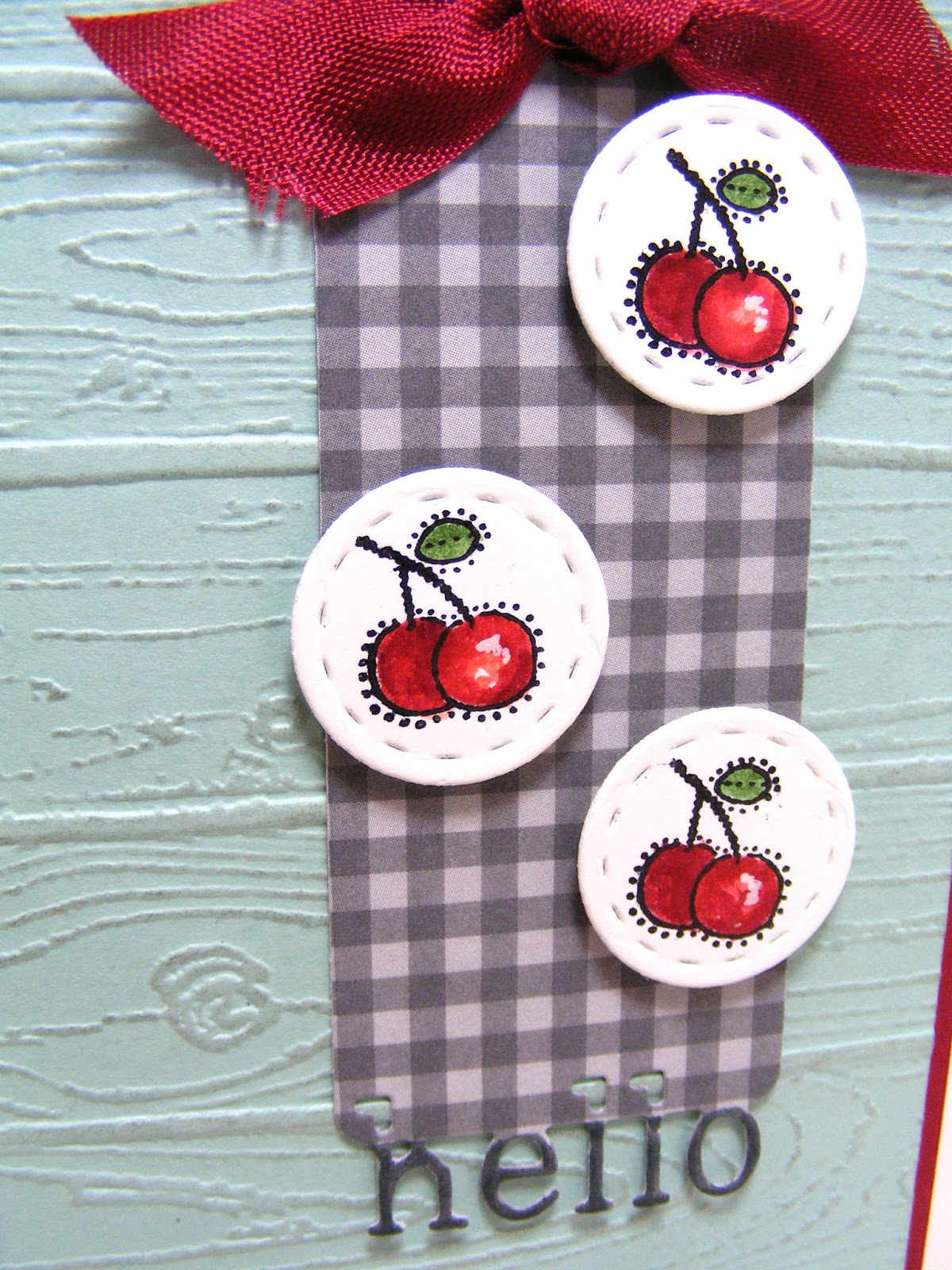
This is just a little notecard (again), because the little cherry images were so small, I thought they would get lost on a larger card...here we go:


I love this card so much, I don't want to send it away, LOL!  I began with a panel of Pool Party, embossed it with the Pinewood Planks EF, then sponged it with Smoky Slate.  It was adhered to a mat of Cherry Cobbler.  I then cut a banner from some Smoky Slate gingham using a Poppystamps die, and embellished it with three little cherries from a really old SU set, which I am thinking might have been an incentive set since I can't find it on Splitcoast Stampers:


I watercolored the cherries with some inks and an aquapainter, and colored the "hello" with a marker.  And I thought I'd share a quick tutorial about how I diecut the stitched circles!  I had stamped my images first, then realized that the die I wanted to use did not have an opening, so I couldn't center my design easily.  So here's my fix:

The die on the right is the one I want to use, but as I said, there is no opening, so I wasn't sure how I was going to center it, so I got the smallest circle die I owned that did have an opening; this one happens to be from SU's Stitched Shapes:


I centered the larger die over my stamped image and used a pencil to draw a circle, using the inner portion of the die as a guide:


I then centered my smaller die, face down, over the image, using the drawn circle as my guide, and ran it through my Big Shot:


And tada!  A nicely-centered design!  I guess ideally, you could diecut first and then stamp, but with smaller wood-mount stamps, as this one was, it would have been a challenge.  I was happy with this technique!


I hope you'll find some inspiration to play along with us at Inspired By this week!  Be sure to check out what the DT has for you as well!  And you might notice a NEW member on the Design Team....my sweet friend Lisa from My Paper Tales!  SO EXCITED!  Be sure to stop by and give her some love! Thanks for popping in today...enjoy your day and be blessed!


Project Details—All Products SU! Unless Otherwise Specified
Stamps Country Occasions (ret)
Card stock & Papers     White Notecard, Whisper White, Pool Party, Cherry Cobbler, Neutrals DSP
 Ink Stazon Black, Cherry Cobbler, Calypso Coral, Garden Green, Smoky Slate
Accessories Cherry Cobbler Seam Binding (ret), Dimensionals,
Tools     Big Shot, Pinewood Planks EF, Sponges, Greeting Tags Dies (Poppystamps), Stitched Circle Dies (Lil'Inker), Aquapainter, White Gel Pen (Zig), Smoky Slate Marker

Wednesday, July 22, 2015

A Real Shaker Card This Time

DSCF0859

Happy Wednesday, peeps!  You all were so gracious about my faux shaker card from Sunday’s post, I thought I would prove to you that I honestly do know how to make a real shaker card!  This idea was rattling around in my head for a while after I received Sprinkles of Life and I finally took it to fruition…no pun intended:

LeAnne Pugliese WeeInklings Sprinkles of Life Shaker Card Stampin Up

I used some Farmer’s Market DSP and the new Tags & Labels dies to make my shaker window.  I stamped and punched out the tree, bird and apples and assembled the whole thing with a window sheet and foam tape. 

DSCF0861

It’s really cute IRL!  I added a couple of banners and stamped the sentiment on an Itty Bitty Banner to finish it off.  And here’s a hint about punching out those small images with the Tree Builder punch.  Stamp your small image on a narrow piece of scrap cardstock (we all have plenty of them, right?):

DSCF0986

Slide the strip into the specific punch area from the back….you should be able to wiggle it through the slot fairly easily:

DSCF0987

Then just punch!  You won’t have a bunch of other punched pieces flying around!   Here’s my little apple, and I still have more cardstock on which to stamp and punch!

DSCF0988

We are on vacation, so I am going to take a little bloggy break, but I’ll be back on Sunday with my Paper Players creation!  Enjoy your week!

DSCF0937